
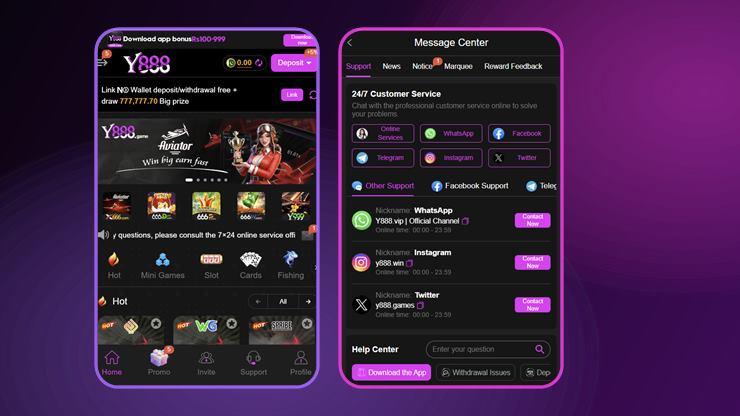
The install and the sign-in are really one job: the account you create in the first five minutes is the account a support desk will have to work with months later if a payout is ever queried. If you want to know what the app offers before you install it, the Y888 game guide sets out every figure we could source.
Before You Download the Y888 App
Where you get the file matters more than anything else on this page. A real-money casino app holds your password and your balance. A repackaged build from a forum, a Telegram channel or a file-sharing mirror can look identical and read everything you type into it. There is no way to tell by looking, and no antivirus check that reliably catches it.
- Use the official link only. The Download button on this page goes to the operator's own install page.
- Do not install a “mod”, “hack” or “unlimited” build. There is no such thing as a modified build that wins more; there are only modified builds that steal credentials.
- Check you have space and signal. A download that stalls halfway produces a corrupt file that Android refuses with an unhelpful error.
- Decide your password now. It must be one you use on no other service, because a wallet balance is a target.
Y888 Download and Install, Step by Step
- Tap the download link and wait for the file to finish completely. Android shows it in the notification shade.
- Open the downloaded file. Android will say the browser is not allowed to install unknown apps.
- Allow this source. The permission is granted to that one browser, not to the whole phone, and can be revoked afterwards in Settings → Apps → Special access.
- Read the Play Protect notice if it appears, then choose to continue. See below for what it actually means.
- Tap Install and wait. Do not switch apps while it runs.
- Open the app and register.
- Claim the Rs 100–999 app bonus from the bar at the top of the home screen.
- Revoke the install permission from the browser once you are done. Ten seconds, and it removes a standing risk.
If you were given an invite link, open the app through that link. Referral attribution is set at the moment the account is created and generally cannot be added afterwards. If the Rs 2,000 invitation reward matters to you, this is the only step where you can get it right — see the invite code guide.
What the Play Protect Warning Means
Android shows a Play Protect notice for every app installed outside the Play Store, including perfectly legitimate ones. It is not a statement that the file is malicious. What it is telling you is narrower and more useful: Google has not scanned this particular package, so it cannot vouch for it.
That is exactly why the source matters. The warning looks identical whether you downloaded the official build or a tampered copy — it carries no information about which. The protection is in choosing the link, not in reading the dialog.
Claiming the Rs 100–999 App Bonus
The bar across the top of the home screen reads “Download app bonus Rs100-999” with a Download now control. Note that it is a range: the app does not promise Rs 999, and it does not state what decides where in the range you land. Plan on Rs 100.
What the bar also does not state is whether the amount arrives as withdrawable cash or as a promotional balance with turnover attached. Our bonus guide goes through every reward the app advertises and flags which ones state conditions and which do not.
You Can Skip the Install Entirely
The same Y888 account works in a mobile browser. Registering and playing that way means no install permission, no Play Protect override, and nothing left on the phone when you are finished. It also removes the entire risk category described above, because there is no package to tamper with.
The trade-offs are small: no push notifications, and you sign in each session unless the browser remembers you. If you are only trying the app out, the browser route is the sensible first step. On iPhone it is the only route, since iOS does not allow sideloading at all.
When the Y888 Install Will Not Work
| What you see | Usual cause | Fix |
|---|---|---|
| “App not installed” | Partial download, or an older copy present | Delete the file, uninstall any previous build, download again |
| “Blocked by Play Protect” | Standard sideload notice | Install anyway — but only if you used the official link |
| Install permission not offered | Permission set at browser level | Settings → Apps → Special access → Install unknown apps |
| “Parse error” | Corrupt or truncated file | Clear the download and retry on a stable connection |
| Not enough storage | Device full | Free space, then reinstall — a half-written package always fails |
| App closes at launch | Outdated build or incomplete install | Reinstall the current package, or use the browser |
| Stuck on a loading screen | Network or regional routing | Switch between mobile data and Wi-Fi and retry |
The APK Details Nobody Can Actually Confirm
Search results for the Y888 download are full of confident specifications. The highest-ranking one gives a version of V1.3.4.5 and a size of 8MB in its specification box — then says “under 50MB” in its own body text a few paragraphs later.
Both cannot be right, and neither is published by the app. Here is what we can actually say:
- File size: not published, and it changes with every release.
- Version number: not published. Check the About entry inside the app after installing.
- Minimum Android version: not published. Android itself refuses the install if the device is too old.
- Star rating: none exists. The app is not on the Play Store, so there is no store rating to quote.
When a page gives you a precise figure for any of these, ask where it came from. Our reasoning, and what we do publish, is on the about page.
Creating a Y888 Account
Registration in this category asks for very little — typically a phone number or email, a password, and an age confirmation. No identity document is requested at sign-up. That makes registering fast, and it also means the credential you choose on day one is the only thing tying you to the account later.
- Choose Register rather than Login.
- Use a contact you actually keep. It is what a support desk will ask for.
- Set a password you use on no other service. This account will hold money.
- Confirm you are 18 or over and accept the user agreement.
- Claim the app bonus from the top bar.
- Bind a second contact method before you deposit, so losing a SIM does not lose the account.
Bind before you deposit, not after. An account reachable only through an SMS code on a SIM you no longer own is an account you have effectively lost — and that is the most common way people lose a balance in this category, more common than any scam. Once there is money in the account, changing its contact details becomes a support request requiring proof of ownership.
Y888 Login, Step by Step
- Open the app and select Login rather than Register.
- Enter the same identifier you registered with — not whichever is more convenient today.
- Enter your password, or request a code.
- Tap Login. If a code was sent, wait the full retry window before requesting another.
When Y888 Login Does Not Work
| Symptom | Likely cause | What to do |
|---|---|---|
| Account not found | Registered by email, signing in by phone | Use the identifier you actually registered with |
| Number not recognised | Leading zero kept after the country code | Enter +92 3XX…, not +92 03XX… |
| Code never arrives | SMS filtering or weak signal | Wait the full window, check blocked messages, then try the other route |
| Password rejected | Password belongs to a different account | Use recovery rather than guessing — repeated failures can lock the account |
| App closes at login | Outdated build | Reinstall the current package, or use the browser |
| Works in browser, not app | Stale app cache | Clear the app cache or reinstall |
| Account suspended | Multiple accounts, or a withdrawal name mismatch | Contact support — do not create a second account |
A failed Y888 login is almost never a ban. If the app refuses your credentials, try the browser version before assuming the account is at fault — that single test separates a stale app build from a real credential problem.
Keeping the Account Secure
- A password used nowhere else. Reused passwords are how accounts with balances get taken.
- Bind a second method so a lost SIM is not a lost balance.
- Never install a modified build. A repackaged app reads what you type into it.
- Treat anyone asking for your password as a thief, whatever they call themselves. No legitimate desk needs it.
- Check the receiving account name before requesting a withdrawal, not after.
- One account per person. Duplicates are grounds to void bonuses and suspend balances, and the agent dashboard counts audits.
- Never post your invitation code or player ID publicly alongside other account details.
Reaching Y888 Support
Y888 has a more complete support setup than most apps in this category, which is worth saying plainly. The Message Center is organised as five tabs — Support, News, Notice, Marquee and Reward Feedback — and the Support tab advertises 24/7 Customer Service across six routes:
- Online Services chat
- Telegram
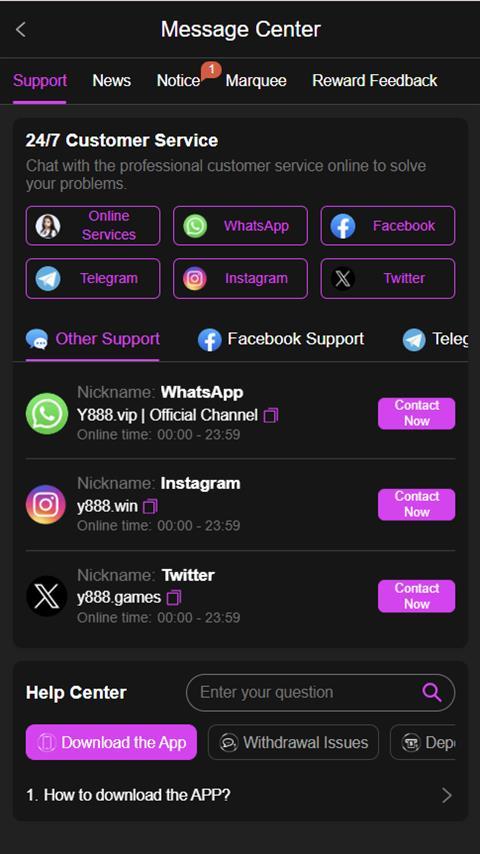
The WhatsApp entry is labelled “Y888.vip | Official Channel” with hours of 00:00–23:59, and the Instagram and Twitter entries carry their own handles. Beneath sits a Help Center whose named topics are Download the App, Withdrawal Issues and deposit problems — which tells you something useful about what people most often need help with.
Two cautions. A broadcast channel is a marketing tool first and a support route second, so use the in-app Online Services chat for anything involving your balance, and keep a record of what you sent and when. And whichever route you use: nobody legitimate will ever ask for your password.
Login and Install FAQs
How do I download the Y888 app?
Through the operator's own Android download link, then allow the install from your browser when Android asks. It is not on the Play Store, so there is no store listing to install from.
Is the Y888 APK safe to install?
The official package is as safe as any sideloaded app — the risk is entirely in where you got it. A repackaged copy can read your password and is indistinguishable by eye. Use the official link, and never a “mod” build.
How big is the Y888 app and what version is it?
Neither is published by the app. The highest-ranking guide page gives 8MB in a spec box and “under 50MB” in its own body text, which is a good illustration of why we do not quote either.
Why is Y888 not on the Google Play Store?
Google restricts real-money gambling apps to a short list of licensed markets, and Pakistan is not among them. Direct download is normal for this entire category.
Can I use Y888 on an iPhone?
Not as an installed package — iOS does not allow it. Use the browser version in Safari instead; it is the same account and the same games.
Why does Y888 say my account does not exist?
Usually because the identifier does not match registration — an email account being signed into by phone, or a number entered with a leading zero after the country code.
Can I have two Y888 accounts?
No. Operators in this category enforce one account per person and treat duplicates as grounds to void bonuses and suspend balances. The Y888 agent dashboard carries an audit counter, so artificial activity is explicitly checked for.
How do I contact Y888 support?
The Message Center lists 24/7 service across Online Services chat, WhatsApp, Facebook, Telegram, Instagram and Twitter, with hours of 00:00–23:59. Use the in-app chat for anything involving your balance.